
The Truth About Multi-Agent Workflows
Are People Actually Using “Agent Teams”?

Multi-agent systems, to me, have felt like a very powerful and fascinating construct ever since I got introduced to them. Sometime at the beginning of the year, agent orchestration became a real thing. Frontier Labs did some cool demos. Companies announced that orchestration is the next frontier for agents. Steve Yegge created gastown as an early open-source framework for orchestrating multiple agents. I began to feel that I needed to upgrade my game.
Last week, I sat down to write a follow-up post on Loops and deep-diving into multi-agent systems. But then I realised something – I personally have had half a dozen multi-agent experiments and use cases sitting in my to-do list which I’m yet to try out. I do use multi-agents for a few things but not to the extent I’ve wanted. That realisation took me down a different rabbit-hole altogether: What are the real use cases which benefit from a multi-agent system? What are the friction points and shortcomings of it? And most importantly, if they’re so powerful, why aren’t more people using them, excluding all the AI-influencer demos?
If you’ve been doom-scrolling AI Twitter, you’ve definitely seen the hype: “I built a 12-agent swarm that codes, writes, and launches SaaS products while I sleep.” Meanwhile, in your actual workflow, you’re still copy-pasting between three different chats and praying nothing explodes. So I set out to find: do people actually use multiple agents simultaneously in a meaningful way today? And more importantly: outside of coding and tech demos, is this “agent team” thing real, or just a fancy word for “I opened three tabs”?
So this article is a bit opinionated and based on my interaction with developers, engineering leaders and non-tech [AI-pilled] folks in my circle. It also includes some online research, for which I actually did use “multi-agents”. I encourage you to share in comments any inaccuracies or contradictions you may have seen compared to my own experience.
This is what I’ve found. The short answer is: yes, people are using multi-agent workflows. But not to the extent that AI-influencers would have you think. Almost no one is running a “swarm of tiny robots”. They’re running it more for role-delegation and evaluating multiple solutions. Let’s break down what’s actually happening in the wild and how Claude, Cursor, and Codex each approach this. I look at specifically those three because I believe they cover the majority of users and use cases.
I reviewed this post after I finished writing it. While I really wanted to explore how this powerful construct of multi-agents can be leveraged by non-tech folks too, unfortunately, the way today’s tools are built, these features are largely targeted towards engineers. So heads-up, this gets a bit technical. But I encourage non-tech folks also to go through it and think about how they can apply these to their own workflows.
The three flavors of multi-agent
1. Claude: The closest thing to a real “team”
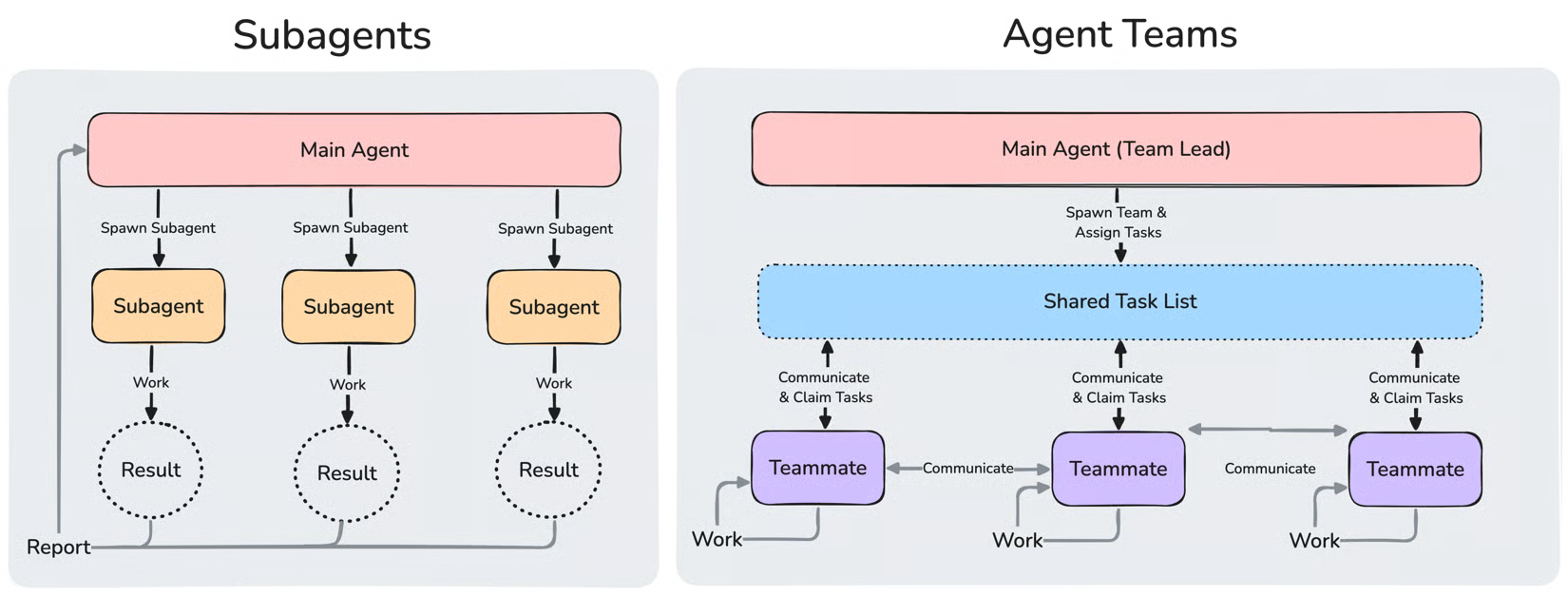
Claude Code’s Agent Teams feature is the most explicit “team of agents” product you’ll find right now. Released with Opus 4.6, it’s designed so that one session acts as a team lead, spawns teammates, and coordinates them through a shared task list and a mailbox system. Note that the feature is still experimental and you have to explicitly enable it in settings.json before you can use it. There are a few tutorials on YouTube that go in more depth about how to set it up and use it, but below are some key features of this:
Team lead + teammates: One main Claude session becomes the manager. It spawns other sessions, each with its own context window and role-specific instructions.
Shared task list: All agents see the same Kanban-style task board. Tasks have states, dependencies, and can be claimed by teammates as they become available.
Peer-to-peer messaging: Teammates can send structured messages to each other directly, not just back to the lead. This is interesting because it means, say for example, a security reviewer agent can flag an issue to the performance reviewer agent mid-run without stalling the whole team.
File locking: When one agent writes to a file, it acquires a lock, so that two agents don’t try to edit it at the same time.
Automatic orchestration: You describe a complex task, and Claude figures out what specialist agents to spawn, in what order, and how they should check each other’s work. But if you’re really particular about those things, you can also specify all of those things explicitly.
In practice, apparently people are using Agent Teams for:
Research tasks with competing hypotheses.
Full-stack features where one agent handles frontend, another backend, and another tests.
Content pipelines: e.g., “take this one webinar and turn it into a week’s worth of LinkedIn posts, X threads, and Instagram captions.”
The most mature examples are still in technical and content-production workflows. Within content and non-tech use cases, only maybe 5% of power users are using this kind of approach.
2. Cursor: The orchestration workspace
Cursor doesn’t call itself an “agent team” platform in the same way. Instead, it’s an agent-first IDE. So it doesn’t have, like, one manager agent directing a team of agents. But instead it has a workspace where you can launch and coordinate many specialised agents.
Cursor seems to have a few different flavours of Agent Teams in that sense.
Human Lead: Cursor introduced a dedicated “Agents Window” outside of the main IDE some time back. They also added support for multiple agent tabs at the same time. But those are totally isolated and independent sessions you’re having with individual agents. So essentially, you are acting as the “human lead” who assigns tasks and coordinates the work between the different agents.
That’s the default mode of working for most people. But if the task is not that big, people don’t usually bother kicking more agents and switching tabs for the same or related task. If the wait time per task is not really long, people will tend to wait and serialise the tasks rather than parallelise for maximum productivity.
I’m not fully sure about the reason for this behaviour, but I myself do it many times. I occasionally run 2-3 parallel cursor agent threads, but usually I just do one at a time. Do people find it interesting to watch the agent think and use different tools to arrive at the answer, or is it just laziness/cognitive-load of opening up another tab, planning the other unrelated task which they could do in parallel while the first is in progress? I think it’s a bit of both.
Best-of-N: Cursor provides a /best-of-n command that runs a given task simultaneously across multiple models. You can provide a list of all the models against which you want to run that task. It then gives you the summary of the result that the models gave consensus for. It also shows which models agreed to a certain approach and which ones differed. This is classic “best-of-N parallelism.”
One funny thing about this feature is that since Cursor is still an IDE and a developer-first tool, if you’re working from a repo, it will assume your task to be coding-related. It will create multiple git worktrees, one for each model, even if you had asked it to do an online research for a topic and give a best-of-n analysis. After finishing the task, Cursor will realise that there are no code changes made and will remove the worktrees.
Build-in-Parallel: This is a relatively new feature, available since May 2026 in Cursor 3.3 and above. This allows you to give a list of independent tasks which Cursor can then run in parallel.
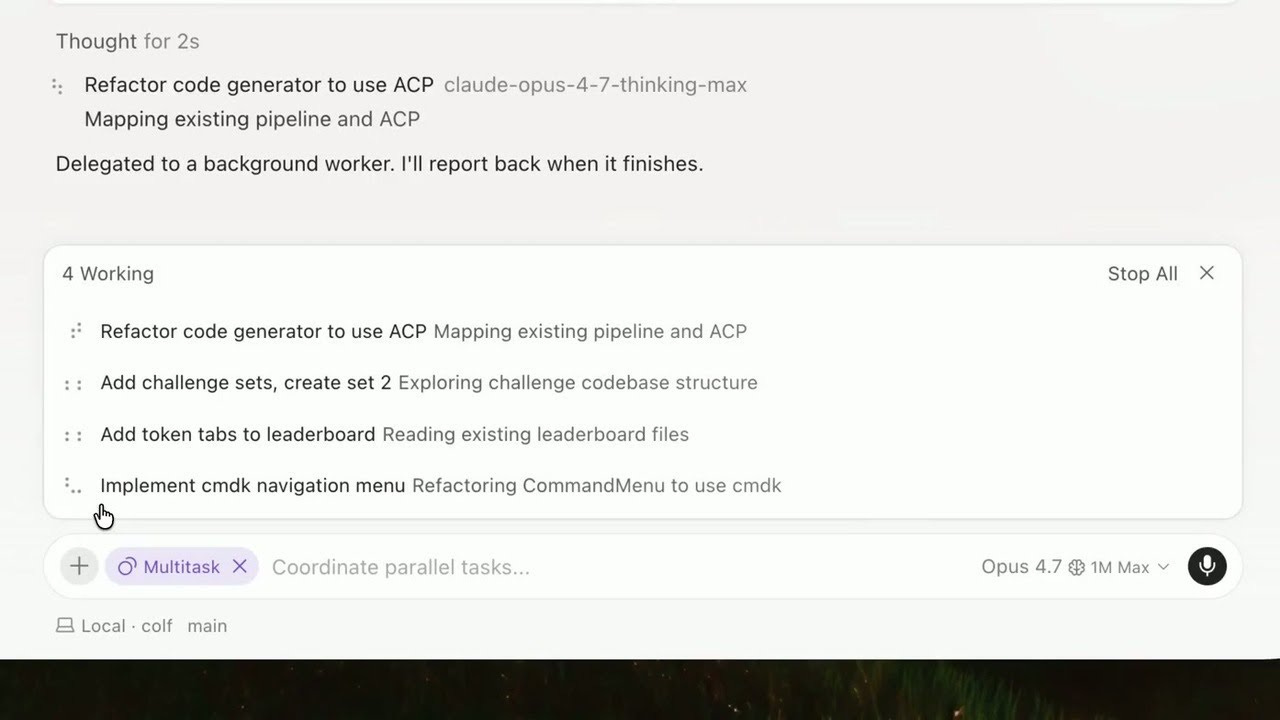
This is how you use it -
Send a multi-step request. E.g. Refactor code generator, Add token tabs to leaderboard, Implement navigation menu.
Cursor produces a plan and shows a “Build in parallel” button pill below it.
Click the “Build in parallel” on the plan card. The agent then spawns one async subagent per independent step.
Each subagent appears as its own row with its own progress indicator and final summary.
The main agent thread is free to interact with you.
A few things to remember regarding /multitask
One thing to note is that this feature is quite different from Claude Code’s Agent Teams. These are really just independent tasks happening in parallel. There is no “Lead” agent and no coordination happening between the subagents.
The subagents also do not work on separate worktrees; they work on the same repo by default. So if your parallel tasks need to modify overlapping files, you’ll need to configure worktrees in
.cursor/worktrees.json.
Actually, this is something to remember about Cursor in general - to my knowledge, there are really only two built-in commands (/best-of-n and /worktree) and the multi-model mode, which work by default on worktrees. Everything else works on the same repo.
While the feature sounds great, I’m yet to see how useful this feature actually is (I’m on an older version of Cursor). At least the people I spoke to haven’t really used it as much.
My hunch is that since it requires you to think of a few independent tasks upfront that can be parallelized and not have any overlapping file edits- that’s asking the users to do a bit of cognitive heavy lifting, which users might defer in favor of simply kicking multiple agent chat threads. It would have been ideal if Cursor itself broke down big, complex tasks into smaller tasks and identified the ones that can be parallelized and just went ahead and did it.
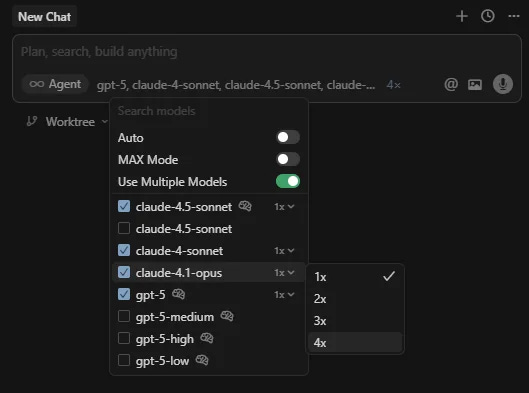
Multi-models mode: This feature has been there for a while. Cursor gives you an option to run any given tasks in parallel with multiple models. You can compare the results, review each model’s code separately and pick the best one. You do this by selecting multiple models in the model picker dropdown. Each model gets its own worktree for making code changes to avoid overlapping code changes.
In many organizations, this feature is disabled since this can easily lead to 3x or 5x the cost of the feature development.
Plan-Build-Review: This is not a feature per se but rather a workflow. You can set up workflows where one model implements, another reviews, and a third checks for style or performance issues. People describe this as “Claude plans, Codex reviews, Composer builds” inside Cursor. Cursor community workflows show patterns like “plan → build → review” with separate agents for each stage.
To summarize, in the wild, Cursor users are doing things like:
Running a planning agent to break down a large feature, then handing slices to separate implementation agents.
Using one agent for UI work, another for backend logic, and another for copywriting or docs.
Launching multiple agents to try different approaches to the same problem, then comparing results.
You could very well call it a multi-agent workflow, but it’s more orchestrated parallelism than a single “team lead” directing everything. Cursor gives the tools for you to design the team structure.
3. Codex: The specialist in a pipeline
OpenAI’s Codex is best thought of as a powerful coding agent that can be slotted into a larger workflow. It’s explicitly asynchronous: you submit a task, and Codex works independently in the background, often returning a pull request with diffs, test results, and explanations.
In advanced setups, people are using Codex as one role in a multi-agent system:
An external orchestrator (like the OpenAI Agents SDK or a Pydantic AI process) drives Codex as an MCP server in a star topology.
Codex handles implementation or review, while other agents handle planning, documentation, or security checks.
Some workflows report significant token savings and higher task success rates when Codex is part of a well-structured multi-agent harness.
Codex itself doesn’t have a public “agent teams” feature in the same sense as Claude. Instead, it’s the specialist builder/reviewer that other tools orchestrate around.
So, are people actually using multiple agents?
Yes, but in very specific patterns, not general “AI swarms.”
The most common real-world multi-agent patterns are:
Plan / build / review. One agent defines scope, one implements, one checks quality. This shows up in Cursor, Claude, and Codex-based workflows.
Parallel research or hypothesis testing. Multiple agents explore different angles, then synthesize. This is classic in Claude Agent Teams for debugging or strategy work.
Role specialization. Separate agents handle UI, backend, tests, copy, docs, or security. Cursor examples show UI/coding/copywriting agents running in parallel.
Best-of-N model comparison. Run the same prompt through multiple models, then pick the best output. Cursor’s
/best-of-nis built exactly for this.kimi+1Long-task splitting. Break a big project into smaller ownership slices so agents don’t clash in the same context or file set. This is where Cursor’s worktrees and Claude’s task lists shine.
Non-coding use cases are emerging too: content repurposing, marketing campaign planning, RFP/proposal drafting, and sales-call-to-asset pipelines. But they’re still a smaller slice of the overall activity compared to coding and technical workflows.
Why not just use one super-agent?
If models are getting smarter, why bother with multiple agents? I believe there are three reasons why it’s better than a single agent:
Context loss. Single agents tend to forget earlier decisions or introduce inconsistencies as tasks grow. Splitting work across agents with focused context windows helps.
Parallelism. Instead of waiting for one agent to do everything sequentially, you can run several in parallel and synthesize the results.
Specialization and review. Different agents can be tuned for different roles (planner, coder, reviewer, writer), and having separate agents check each other’s work reduces errors.
Should you have FOMO for not using multi-agents?
The biggest tell that the multi-agent pattern is not in vogue yet is that, as of now, across the tools, there is only one true “Agent teams” feature, which is available in Claude Code, and even that is still experimental. So you’re not far behind for not using it.
Very few developers I’ve spoken to have actually used multi-agents and multi-agent loops. The ones who have used it, did so only a couple of times for doing large refactoring or large feature development. Even for large tasks thrown at multi-agents and loops, people reported completing the tasks within 1- 3 hours. So my guess is, there are not very many tasks that require such horsepower. And even for those tasks, people tend to resort to human planning and parallel task delegations to “human teams” rather than “agent teams”.
The bottom line
People are using multiple agents simultaneously, but not as a sci-fi swarm as of today. They’re using them as structured workflows: plan/build/review, parallel research, role specialisation, best-of-N comparison, and long-task splitting.
Claude’s Agent Teams give you the closest thing to a real coordinated team, with shared task lists, peer-to-peer messaging, and file locking. Cursor gives you a powerful orchestration workspace with /best-of-n, multi-model review, and git worktrees. Codex slots in as a specialist coding agent inside larger pipelines.
If you’re not using Agent Teams, you probably aren’t missing out on a lot. But I still think it’s a good skill to acquire for the future as we move from more human teams to agent teams, bigger/complex tasks per engineer and better and cheaper models.