

In my first post on loop engineering, I covered five building blocks: automations, worktrees, skills, connectors, and sub-agents. I also mentioned a sixth thing that Addy Osmani calls the spine of the whole system, which is memory. I left it there with a single line and a promise to come back to it. This is that post.
Memory is the building block that decides whether a loop actually gets better over time or just repeats the same mistake on a schedule. A loop without memory runs fine every single time, and every single time it starts from zero, re-reading the codebase, re-deriving conclusions it already reached, and sometimes retrying the exact fix that failed yesterday because nothing told it that fix already failed.
That’s the failure mode this post is about, not a crash or an error, but a loop that works, technically, while quietly wasting a share of every run relearning what it already knew.
What memory actually is in a loop
People conflate memory with two other things, so it’s worth being precise about what it isn’t before getting into what it is.
Memory is not the context window. A Claude Code session holds a conversation in its context window while it’s running, and that context disappears the moment the session ends. If a loop kicks off a fresh session every morning, that session has no idea what happened yesterday unless something outside the session told it. The context window is short-term and session-scoped, and memory has to survive past that.
Memory is not a skill either. A SKILL.md file holds project conventions: how to run tests, how PR titles should be formatted, which files are off-limits. That information is static. It doesn’t change from one loop run to the next, which is exactly why it belongs in a skill and gets loaded fresh every time. Memory is the opposite. It’s the part that does change every run, because it’s a record of what actually happened: which issues got triaged, which fix attempt failed and why, what the loop is currently waiting on. A skill tells the loop how to work. Memory tells it what’s already been done.
In practice, four things need to persist across runs: the decisions the loop made and the reasoning behind them, so a later run or a human reviewing the log understands why the code looks the way it does; what failed and why, so the loop doesn’t burn a turn retrying an approach that’s already been ruled out; the current status against whatever goal the loop is working toward, so an interrupted run can resume instead of restarting; and handoff notes for whoever picks this up next, whether that’s another agent or a person reading the standup summary the next morning.
Three memory patterns, with a real example
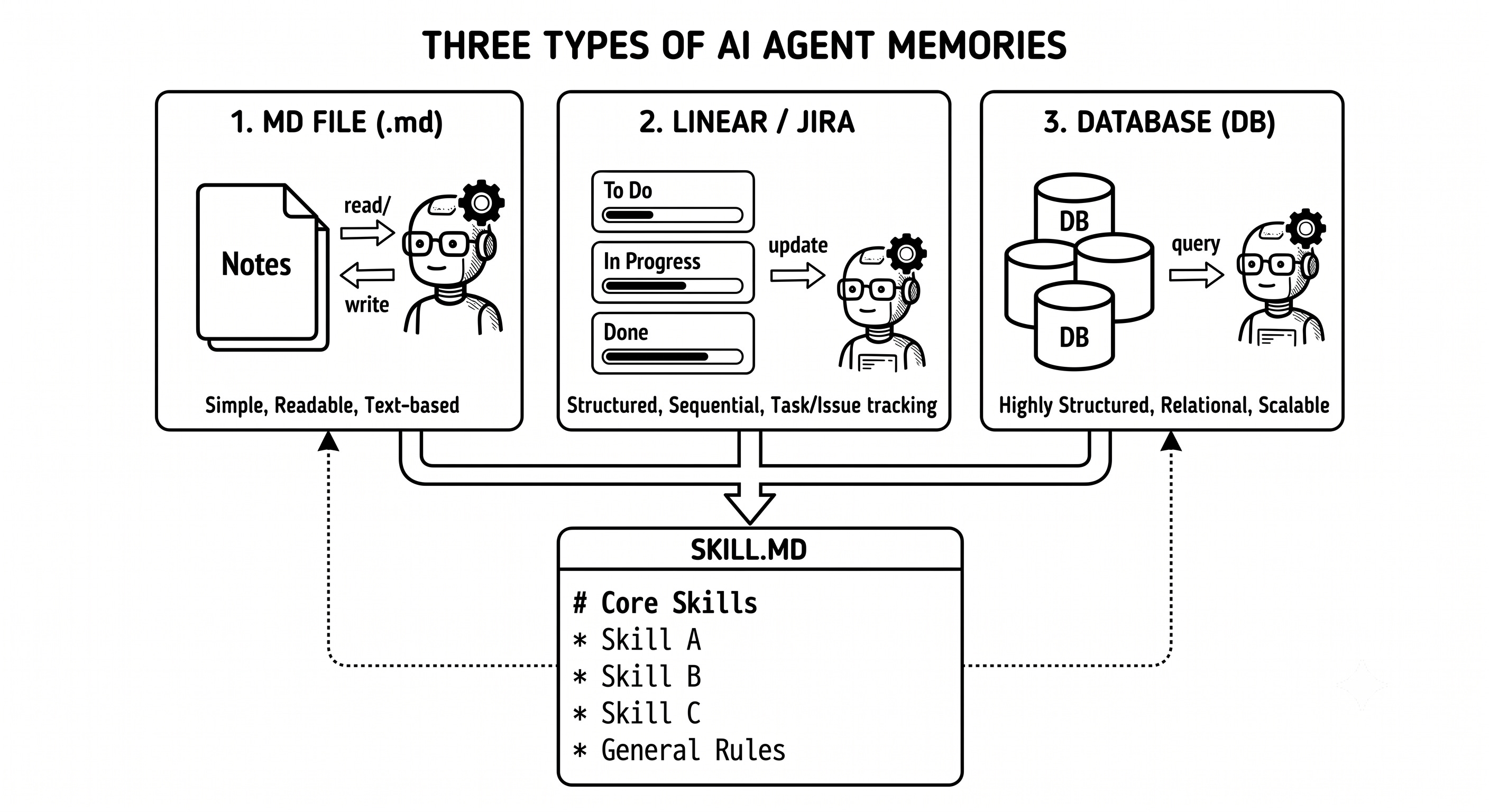
The simplest pattern, and the one worth starting with by default, is a flat markdown file. In the GitHub triage loop from my first post, the triage agent wrote its classifications to a triage.md file, and issues that failed review got logged to flagged.md. That’s memory in its most basic form, a plain text file that any agent can read and write, that a human can open and understand without any tooling, and that lives in git so changes to it are tracked the same way code changes are. For a solo project or a small team, this is usually enough, and it’s the pattern I’d default to.
One practical question comes up immediately with this pattern: does the memory file belong in the main branch alongside the code, or somewhere separate? Committing it to main means every commit that touches code can also show what the loop was thinking at the time, useful for a human reviewing history later. The tradeoff is that a fast-growing memory file adds noise to the commit log for a directory nobody but the loop reads day to day. A middle ground that works well in practice is keeping the memory file in its own directory, committed but excluded from normal code review, so it’s tracked and diffable without cluttering pull requests built around actual code changes.
The second pattern is a task tracker, meaning Linear, GitHub Issues, or something similar. This is worth reaching for when the state needs to be visible to humans and other agents at the same time, and when the workflow already has native states worth plugging into, like open, in review, or blocked. If the fix agent from the triage loop opened a PR and linked it to a GitHub issue, the issue itself becomes part of the memory. It carries status, comments, and history that both people and agents can read without any of that structure being built by hand.
The third pattern is a structured store, either a database or a vector store for semantic recall. This is the heaviest option, and it’s only worth the added complexity once a loop has enough history that a flat file becomes hard to search, or once the loop needs semantic lookup rather than exact text matching, like finding issues related to auth timeouts rather than issues containing the literal string “timeout.” If a loop hasn’t run into that problem yet, this pattern is premature. Start with the flat file.
Let’s take another example where the choice of memory becomes important. Think of a content pipeline loop that runs weekly, drafts LinkedIn and X posts repurposing a new Substack article, and checks whether a similar angle has already been published so it doesn’t repeat itself. Whether a draft has already shipped is a flat-file lookup, easy to check against a running log. Whether a similar angle has already been covered is a different kind of question, because two posts can cover the same underlying idea in completely different wording. That’s a semantic question, not an exact-match one, which is exactly the kind of case a vector store earns its complexity for, embedding summaries of past posts and querying by meaning instead of by keyword.
Here’s how the flat file pattern gets wired in so updates happen automatically instead of depending on the agent remembering to do it. Two hooks handle this: SessionStart, which fires when a new session begins, and Stop, which fires when the agent finishes.
{
  "hooks": {
    "SessionStart": [
      {
        "hooks": [
          {
            "type": "command",
            "command": "cat memory/loop-state.md"
          }
        ]
      }
    ],
    "Stop": [
      {
        "hooks": [
          {
            "type": "command",
            "command": "echo \"## Run $(date -u +%Y-%m-%dT%H:%M:%SZ)\" >> memory/loop-state.md"
          }
        ]
      }
    ]
  }
}
The SessionStart hook reads the memory file into context before the loop does anything else, so every run begins with what the previous run learned instead of starting cold. The Stop hook appends a timestamped entry when the run finishes. In practice the agent itself would write the substantive content, meaning what it decided, what failed, and what’s still open, rather than a bare timestamp, but the hook guarantees the update happens every run regardless of whether the agent remembers to do it as part of its own instructions.
Where memory breaks
The first failure mode is staleness. Nobody prunes the file, so it grows every run, and eventually the loop spends a real share of its token budget reading history that’s no longer relevant to the current task. A huge memory file needs either a pruning step, dropping entries older than a set number of runs, or a summarization step that compresses old entries into a shorter record, built into the loop itself. Treat this the same way you’d treat log rotation. It stops being optional past a certain scale.
The second failure mode is drift, and it shows up specifically when more than one agent writes to the same memory file. If two fix agents are running in separate worktrees and both try to append to the same flagged.md, the writes can interleave or overwrite each other depending on how the hook is set up. This is the same coordination problem I’ll get into in more depth in the post on parallel agents, but the short version is that a shared memory file needs a single owner. Either one agent, usually a main orchestrating agent, is the only one allowed to write to it, or each parallel agent writes to its own file and something merges them afterward.
The third failure mode is treating memory as a dumping ground instead of a curated record. If a loop logs everything it does, including routine steps that didn’t fail and didn’t require a decision, the memory file stops being useful because a reader, agent or human, has to wade through noise to find what mattered. The rule I use is that memory should record decisions, failures, and open questions, not a transcript of every action taken. If a step went exactly as expected and required no judgment call, it doesn’t need an entry.
A dumping-ground entry looks like this: “Ran tests, all passed. Checked lint, no errors. Reviewed auth.ts, looks fine. Moved to next file.” None of that required a decision, so none of it earns a place in memory. A curated entry for the same run looks like this instead: “Auth module refactor: skipped the token-refresh function because it touches session storage directly. Flagged for human review per the SKILL.md rule on auth changes. Tests pass on everything else.” The second version is shorter, and it’s also the only one a later run, or a human, actually needs to read.
There’s a fourth failure mode worth naming separately, because it’s specific to the hook pattern shown earlier rather than a general memory design mistake. The Stop hook fires once per turn, meaning once every time Claude finishes responding, not once at the true end of a multi-turn loop. A /goal loop with --max-turns 30 can run through many of those turns before the evaluator confirms the goal is met, and the plain append-on-Stop pattern from earlier would write one timestamped entry for every one of those turns instead of a single entry summarizing the finished run. This distinction doesn’t matter for a loop that only ever runs one turn per invocation, like the cron-triggered triage loop from my first post, since one turn and one run are the same thing there. It matters for anything using /goal with a real turn budget, where dozens of turns can happen inside a single run.
The fix is to be more deliberate about what the Stop hook actually does. Stop hooks can block Claude from actually stopping, which means a Stop hook can check whether the agent has written a real memory update this run and push Claude to do it before the session is allowed to end, instead of blindly appending a timestamp on every single trigger.
When memory becomes a skill
There’s a natural next step once a memory file has been running for a while: some entries stop being one-off history and start being a pattern. If a memory file shows the same kind of failure across several runs, the same edge case tripping up the loop three separate times, that stops being a fact about one run and becomes a convention the loop should have known from the start.
That’s the moment to move it out of memory and into the SKILL.md. Memory holds “this specific run hit this specific problem.” A skill holds “this class of problem always gets handled this way.” The migration is straightforward: read back through memory for entries that keep recurring, generalise the specific case into a rule, and add it to the skill so every future run starts already knowing it instead of rediscovering it. I’ve written about what makes a skill worth keeping in my two-part series on Claude Code skills; the short version is that this graduation path, from a repeated memory entry to a permanent skill rule, is one of the more reliable ways a skill earns its place instead of rotting.
To summarise, there are three things to carry out of this. Memory is distinct from both the context window and a skill: the context window is session-scoped and disappears, a skill is static and doesn’t change run to run, and memory is the dynamic record of what actually happened. You can start with a flat markdown file before reaching for a task tracker or a database, because most loops never actually outgrow it. And you should wire memory updates into hooks, SessionStart to read and Stop to write, so the update happens automatically instead of depending on the agent remembering to do it as one more instruction among many.
The loop that seems to be running fine but never gets any better is usually missing this piece, not because it’s broken, but because it has no way to remember what already happened.
Next in this series, I’m covering parallel agents: worktrees, sub-agents, and Claude Code’s newer Agent Teams feature, and how to actually run several agents on the same problem without their state colliding, which is the drift problem from this post at a larger scale.